Crisis simulation software A live crisis, run on a clock and scored as it happens.

Prophyion is crisis simulation software for live, multi-team exercises. It drafts the scenario from your own plans, fires injects on a timeline or when conditions trigger, simulates the social media, press and inbox pressure around the incident, and grades every decision while your people are still making it.

Built in Singapore. Runs in a browser, with nothing to install.

Access
Browser
laptop or phone
Scoring
1–10
every decision
Report
Same day
PDF or Excel
Trainer dashboard · live feed
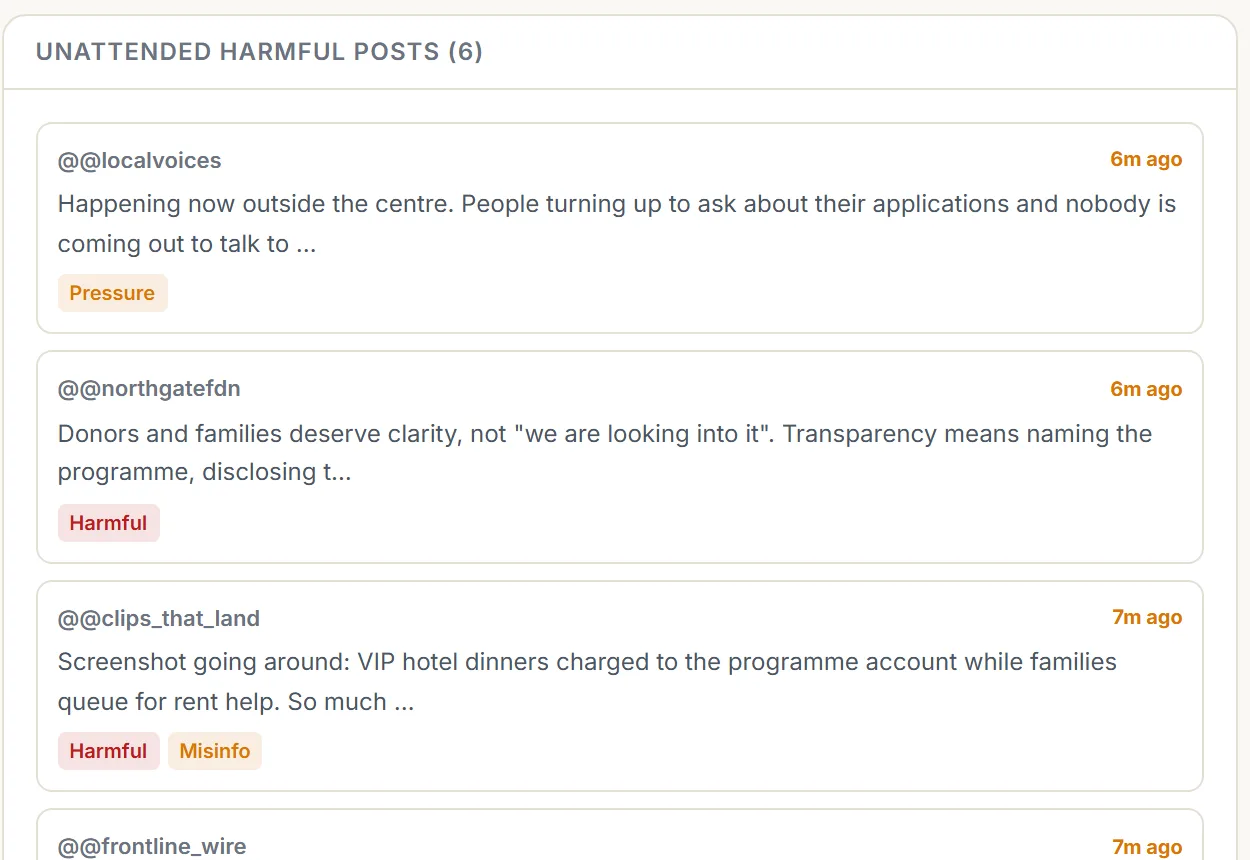
The trainer dashboard's live feed, with each incoming post tagged as harmful, misinformation, inflammatory or pressure.
Every post is classified as it lands, so the facilitator can see what a team has left unanswered without reading the whole feed.

What the software does

Everything a live crisis exercise needs, in one environment

Your facilitator keeps the judgement. The software handles the scenario, the tempo, the pressure and the record.

Scenarios from your own documents

Upload a crisis plan, incident brief or standard operating procedure. The blueprint engine drafts the scenario, the characters, the fact sheets and each team’s storyline, and your team reviews every line before anything runs.

Injects that fire themselves

On a timeline, triggered by what a team does or fails to do, or pushed by the facilitator to lean on a team. Nobody reads inject cards aloud.

A simulated media environment

Two social media platforms, an inbox, a news site and a team chat, all live. Nothing a participant posts can reach the public internet or a real system.

Multi-agency roles, partial information

Each team works from its own slice of the picture, with role-scoped channels and in-app voice. Whether they share what they know is part of what gets measured.

Outcomes that branch

Late or weak decisions escalate the incident. Timely ones settle it. Run the same scenario twice and you get two different exercises.

Scored as it happens

Every decision is graded for robustness against sector standards, with decision latency and a coordination score. The after-action review is generated when the simulation ends.

Adversaries that push back

Hostile accounts probe your teams, and every public statement is fact-checked against the scenario’s own record of what is true.

Live maps of real places

Site exercises run on real building footprints and street layouts, with a crowd simulation underneath that reacts to every cordon and evacuation decision.

Baseline and retest

Run the same scenario before and after training, and show the improvement with the same scoring.

Exercise formats

Three crisis simulation formats on one platform

Same scoring and the same report in every case. Pick the format that matches what you need to prove.

An emergency operations centre, figures at a wall of maps marked with incidents

Format 01

Multi-agency coordination

A shared operating picture where police, medical, comms and command each see a different slice of the truth. The exercise is about information flow, chain of command and who tells whom. Best for command groups and executive teams.

Responders in high-visibility jackets directing a crowd away from a venue at dusk

Format 02

Site and public safety response

A live map of a real location with a crowd simulation running underneath. Cordons, evacuation corridors and casualty deterioration are all modelled, so every decision has a visible consequence.

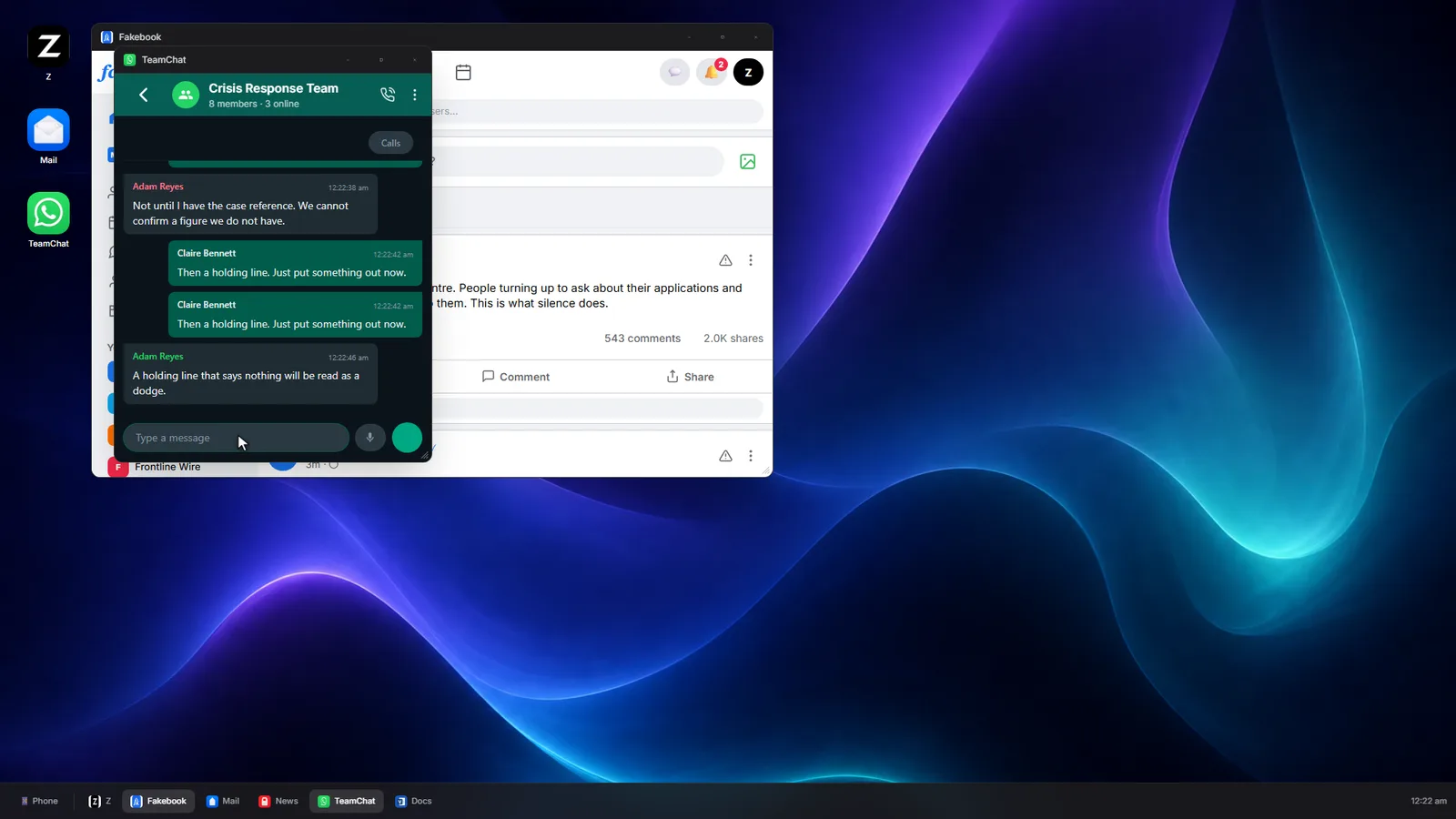
A participant's simulated desktop with the crisis response team chat open beside a social feed

Format 03

Corporate crisis communications

A simulated social media feed, inbox and news cycle turns on your organisation while misinformation moves faster than your approval chain. For communications, legal and leadership.

Crisis communications simulation

Versus a tabletop exercise

Crisis simulation software versus a paper tabletop

A tabletop exercise is a structured discussion of what a team would do. A simulation is the situation itself, moving whether or not the team is ready.

A paper tabletop exercise compared with a Prophyion crisis simulation, stage by stage
Stage Paper tabletop exercise Prophyion crisis simulation
Scenario prep Days of writing, formatting and printing Drafted from the plans you already have
Injects A facilitator reads cards aloud and watches the clock Fire on a timeline, or when a team’s decision triggers them
Media pressure Printed posts and emails handed round the table Live social media, inbox and news that react to what your team says
Scoring Subjective, from memory and margin notes Every decision graded 1–10, with decision latency
After-action review Written over the following week Generated when the simulation ends, exported to PDF or Excel
Replay Whatever people remember Full timeline of every decision, message and inject
Branching One fixed script, the same ending every time Escalation and de-escalation paths, so no two runs are the same

What gets measured

Numbers for the debrief, not impressions

The question every leadership team asks afterwards is how the response went. The after-action review answers it the same way every time.

Metric 01

Decision latency

How long each team took to act once the inject landed, measured to the second.

Metric 02

Coordination score

Whether teams shared what they knew, and with whom, or sat on it.

Metric 03

Robustness, 1–10

Each decision rated against sector standards. Generic answers score poorly by design.

Metric 04

Impact matrix

Which team’s call created which team’s problem, laid out side by side.

Live escalation meter Full timeline replay Per-participant scoring PDF and Excel export

Security and data handling

Your crisis material is never used to train an AI model

A realistic exercise means handing us your risk register, your escalation thresholds and the things your executives would actually say at three in the morning. That material is treated as what it is: some of the most sensitive information your organisation holds.

No training, no fine-tuning

Your scenario material and every decision made during a simulation are processed to run your exercise and nothing else. They are never used to train or fine-tune any model, ours or a vendor’s.

Private inference on AWS

Language models run through Amazon Bedrock. Prompts and responses are not shared with the model providers and are not retained by them. That is an AWS contractual commitment, not a setting we toggle.

In-region and isolated

Your data stays in the AWS region agreed with you at scoping. Each client’s material is kept separate; nothing is pooled across engagements.

Yours to remove

Request a full export or permanent deletion of everything from an engagement at any point, during or after it.

Fictional and non-operational

Scenarios are invented. They are built to resemble your exposure closely enough to be uncomfortable, without documenting a real target, a real vulnerability or a real operational plan.

Nothing touches a real platform

The feeds, inboxes, news outlets and messaging your people use during the exercise are all simulated inside the environment. Nothing a participant posts can reach the public internet or a real system.

Ways to use it

Run by us, or run by your own consultant

For organisations

A managed crisis simulation engagement

A Prophyion risk consultant builds the scenario with you from your crisis plan, risk register and standard operating procedures, facilitates two live simulations, and presents the scored after-action review. One engagement, quoted as a single figure.

What an engagement includes

For risk consultants

The platform, with your own clients

Bring your brief, invite the teams, run it live, and hand over an after-action review you did not have to write. Your client is invoiced directly and pays online, so you keep the relationship without the admin.

Crisis exercise software for consultants

Questions

About the software

What is crisis simulation software?

Software that runs a live crisis exercise. Instead of a facilitator reading out scripted updates, it advances a fictional incident on a clock, delivers injects through simulated channels such as social media, email and news, reacts to the decisions participants make, and records every decision so the debrief is built on evidence rather than memory.

How is it different from a tabletop exercise?

A tabletop exercise is a discussion of what a team would do. A simulation makes them do it: the situation moves whether or not they are ready, late decisions have visible consequences, and every call is timed and scored.

Can our own team run the software?

Organisations usually work with a Prophyion risk consultant, who builds and facilitates the exercise for them. Independent risk consultants use the platform directly with their own clients.

What do participants need?

A browser each, on a laptop or a phone. There is nothing to install and no VPN, and voice runs in the browser too. Teams can sit in one room or in different countries.

Where is our data processed, and is it used to train AI?

Language models run through Amazon Bedrock, in the AWS region agreed with you at scoping. Your scenario material and every decision made during a simulation are never used to train or fine-tune any model, ours or a vendor’s.

How long does it take to build an exercise?

Most of the time is your review of the draft scenario rather than the build. A Corporate Crisis exercise typically takes two to three weeks from the scoping call, and we give you a firm date for any format at that call.

Is Prophyion available in Singapore and Southeast Asia?

Yes. Prophyion is based in Singapore, and because everything runs in a browser, regional teams across Southeast Asia can take part in the same exercise.

Put your own plan through it

A scoping call is a conversation, not a commitment. Tell us what keeps you awake and we will come back with a scenario outline and a recommended format.